
What happens when your EHR goes down unexpectedly?
For a few minutes, the answer might seem straightforward: your IT team works to restore it. But as the outage continues, the problem quickly moves beyond technology. Clinicians may struggle to access patient information, medication and diagnostic orders may be delayed, and administrative teams may have to fall back on manual processes.
The bigger question is whether your organization can keep critical operations moving while the system is down.
EHR resilience depends on how well your clinical workflows, technology, people, and recovery processes work together during an outage. That means knowing which functions are most critical, where dependencies exist, how quickly systems need to recover, and how effectively your teams can execute the plan under pressure.
A practical resilience strategy helps you identify where downtime could hurt most, address critical gaps, and invest in the capabilities that keep essential operations moving.
Why Is EHR Downtime a Critical Risk for Hospitals?
An EHR outage can affect far more than your technology environment. Once clinicians, administrative teams, or other departments lose access to critical systems and information, normal operations can quickly slow down.
The impact depends on what becomes unavailable, how long the disruption lasts, and how well your organization can continue critical work without its usual digital workflows.
The impact typically shows up in three areas:
1. Patient Safety and Continuity of Care
Clinical teams rely on timely access to patient information to make decisions and coordinate care. During downtime, access to records, medications, orders, results, and documentation may be limited or require alternative processes.
Your priority is to keep critical care moving safely while those workflows are disrupted.
2. Operational and Financial Disruption
Downtime can affect registration, scheduling, documentation, billing, revenue cycle activities, and other administrative workflows. Teams may have to rely on manual processes, creating delays and additional work.
Even after the EHR is restored, delayed documentation, data reconciliation, and operational backlogs can keep teams from returning to normal immediately.
3. Compliance, Reputation, and Enterprise Risk
An outage can create challenges around documentation, regulatory requirements, privacy, and communication. Patients may experience delays, while staff have to manage disruption under pressure.
For healthcare executives, these issues are connected. A technology outage can quickly become a clinical, operational, financial, and reputational risk.
Before you can strengthen EHR resilience, you need to know where your organization is most exposed.
Build a More Resilient EHR Environment
Strengthen your EHR with reliable integrations, accessible data, and technology designed for long-term continuity.
Where are Healthcare Organizations Most Vulnerable to EHR Downtime?
An EHR outage does not always start with the EHR itself. EHR systems, infrastructure, vendors, and integrations can each create their own points of failure.
For technology leaders, understanding these dependencies matters because a failure in one part of the environment can affect EHR access and the workflows built around it.
Cyberattacks and Ransomware
Ransomware can take systems offline, restrict access to data, or force parts of your environment to be isolated. The financial impact of that downtime can also be significant. Ransomware downtime costs U.S. healthcare organizations about $1.9 million per day (Healthcare IT News).
Recovery can become especially difficult when the infrastructure needed to restore operations is also affected. Cyber resilience should therefore be considered alongside your EHR downtime planning.
Infrastructure, Network, and System Failures
Network disruptions, storage failures, hardware issues, power events, and application failures can all interrupt EHR access. Redundancy can reduce the exposure, but only when failover capabilities are properly designed and tested.
EHR, Cloud, and Vendor Dependencies
Your EHR software may rely on a vendor, cloud platform, or externally managed infrastructure, particularly in legacy EHR environments. An outage within that provider’s environment can affect your organization even when your internal systems are operating normally.
Your resilience assessment should include vendor recovery capabilities, service commitments, incident communication, and dependency concentration.
Third-Party Integrations and Technology Dependencies
The EHR rarely operates in isolation. Laboratory systems, pharmacies, imaging platforms, identity services, interfaces, and other connected technologies can become critical dependencies.
A failure in one of these services may affect a specific workflow or prevent information from moving where it needs to go.
Planned Maintenance, Upgrades, and System Changes
Downtime is not always unexpected. Maintenance, upgrades, migrations, configuration changes, and other technology initiatives can introduce availability risks if you overlook dependencies and recovery procedures.
How to Assess Your Organization’s EHR Resilience
Knowing where downtime can originate is only part of the picture. You also need to understand which failures your organization can tolerate, how quickly critical functions need to recover, and where your current capabilities fall short.
So, where do you start?
Map Critical Workflows and Dependencies
Start with the workflows that cannot simply stop during an outage. Consider emergency care, medication management, patient identification, documentation, diagnostics, communication, and essential administrative processes.
Then map the applications, interfaces, infrastructure, identity services, and third parties those workflows depend on. This can uncover dependencies and single points of failure that may not be obvious when you assess systems separately.
Define Recovery Requirements
Not every system or workflow needs the same recovery target. Your clinical and business priorities should determine how quickly different functions must return and how much data loss you can tolerate.
Define appropriate Recovery Time Objectives (RTOs), Recovery Point Objectives (RPOs), and maximum tolerable downtime for critical functions. These targets give your technology teams measurable requirements to design and test against.
Identify Resilience Gaps
Now compare those requirements with what your organization can actually recover today.
Look for gaps in backup and restoration, failover, manual workarounds, data availability, infrastructure capacity, and vendor recovery commitments. Pay close attention to assumptions that have never been tested under realistic outage conditions.
The goal is to get a clear picture of where your resilience falls short and what needs attention first.
Steps to Build an EHR Downtime and Digital Resilience Strategy
Once you understand your critical workflows, recovery requirements, and resilience gaps, the next step is to turn those findings into an operating strategy for EHR downtime. It should define decision-making, downtime procedures, communication, and the path back to normal operations.
The following steps provide a practical framework for building that strategy:
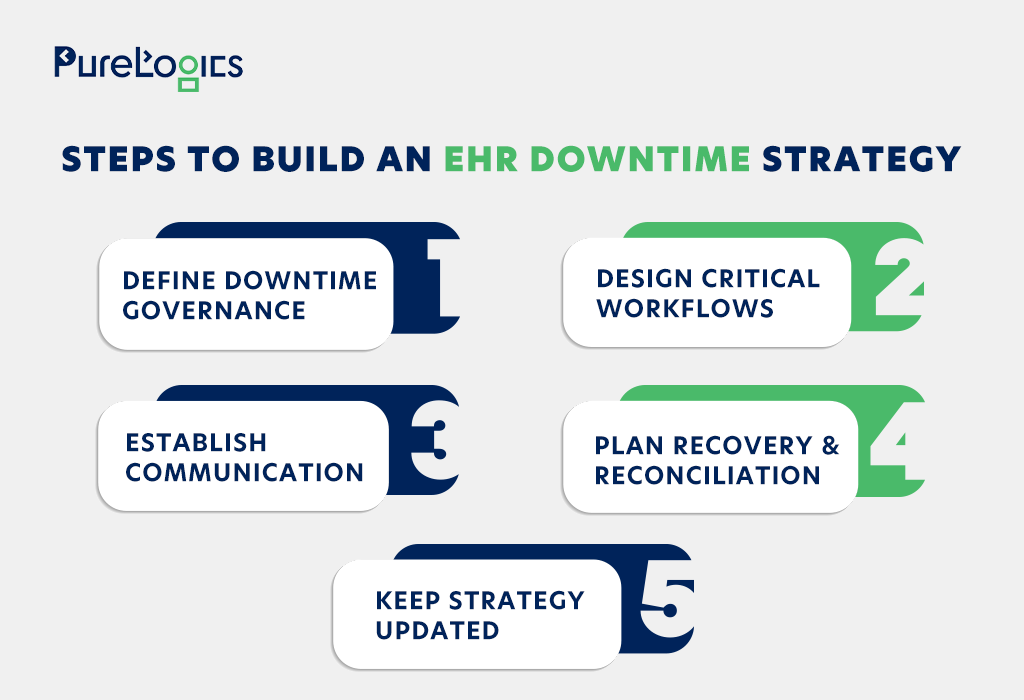
1. Define Downtime Activation and Governance
Your teams need to know when an EHR disruption becomes a formal downtime event and who has the authority to activate the response. Define clear activation criteria for different types of outages, including partial disruptions that affect specific applications, locations, or clinical functions.
Your governance structure should establish:
- Activation authority: Who can declare downtime and initiate the response?
- Decision-making authority: Who approves major recovery, workaround, or vendor escalation decisions?
- Escalation thresholds: When should an incident move from an initial response to an enterprise-level response?
- Roles and responsibilities: Which teams own clinical, technical, operational, security, and communication decisions?
Clear ownership helps prevent delays and conflicting decisions when an outage is already affecting patient care and daily operations.
2. Design Critical Downtime Workflows
Once downtime is activated, staff need clear instructions on how to continue essential work without normal EHR access. Instead of relying on broad instructions, your EHR downtime procedures should define the actual workflows teams will follow. Depending on your environment, these may include:
- Orders and results
- Clinical documentation
- Medication management
- Referrals and care coordination
- Laboratory and diagnostic workflows
- Patient registration and identification
- Scheduling and other essential administrative processes
Each workflow should also explain how information is captured during downtime and how it will be reconciled after systems are restored. Procedures that look complete on paper but are difficult to execute under pressure are unlikely to provide reliable continuity.
3. Establish Communication and Escalation
A downtime strategy also needs a reliable communication structure. Staff should know how they will be notified, where they can find current instructions, who provides updates, and how issues escalate as the incident develops. Your communication and escalation process should establish:
- Vendor communication when external providers are involved
- Executive reporting for prolonged or high-impact disruptions
- Escalation paths for unresolved clinical, technical, security, or operational issues
- Notification channels for activating downtime procedures and sharing status updates
- Communication ownership so teams know who is responsible for coordinating information
Your communication plan should also account for situations where normal communication systems are unavailable.
4. Plan Recovery and Reconciliation
Restoring EHR access does not immediately return the organization to normal operations. Your recovery process should define how you will review, enter, reconcile, and validate information created during downtime. The key recovery activities may include:
- Resolving data discrepancies
- Processing operational backlogs
- Validating interfaces and connected systems
- Reconciling downtime documentation and orders
- Reviewing medications, results, and other critical clinical information
- Confirming that core clinical and administrative processes have returned to normal
Assign ownership for these activities before an outage occurs. Without clear responsibilities, recovery work can become fragmented and extend the operational impact beyond the technical restoration itself.
5. Maintain and Update the Strategy
An EHR downtime policy and strategy cannot remain static. Changes to applications, integrations, infrastructure, vendors, clinical workflows, and organizational structures can introduce new dependencies or make existing procedures outdated.
It is important to review and update the strategy when:
- Downtime incidents or exercises reveal weaknesses
- Major EHR or infrastructure changes are introduced
- New applications, integrations, or vendors are added
- Clinical workflows or organizational structures change
- Recovery testing identifies gaps in procedures or responsibilities
Keep the strategy current as your environment changes. This ensures downtime procedures remain aligned with how your teams operate.
Where Should Executives Prioritize Resilience Investments?
Once you identify resilience gaps, you can’t address every issue at once. Healthcare executives need to prioritize investments based on the clinical and operational consequences of failure, recovery requirements, and the dependencies that could interrupt critical services.
When you’re deciding where to invest, focus on the areas that could cause the biggest disruption if they fail:
Your resilience investments should align with the essential clinical functions and recovery requirements identified earlier. This includes healthcare software development decisions that affect integration, data availability, and workflow reliability.
How to Test EHR Downtime Readiness
An EHR downtime plan only proves its value when your teams can execute it under pressure. Test both technical recovery and the clinical and operational workflows that keep your organization running when the EHR is unavailable. Keep testing focused on the capabilities that matter most:
- Technical recovery: Test failover, backup restoration, and recovery against defined RTOs and RPOs.
- Critical workflows: Test documentation, medication management, orders, results, and registration processes.
- Communication: Confirm staff know how to activate, manage, and escalate downtime across teams.
- Reconciliation: Test how downtime records, orders, and data are captured and reconciled after recovery.
- Lessons learned: Use test findings to improve procedures, technology, communication, and staff training.
Final Takeaway: Building Resilience Into EHR Operations
EHR downtime can disrupt far more than system access. When critical workflows, recovery processes, and teams are prepared for an outage, your organization can limit disruption and recover more effectively.
That starts with understanding your risks, planning for the workflows that matter most, and choosing EHR downtime solutions that support continuity. The right EHR development services can strengthen integration, data availability, and workflow reliability, giving your teams a stronger foundation for digital resilience.
Frequently Asked Questions
What are common causes of EHR downtime?
EHR downtime can result from cyberattacks, infrastructure or network failures, software issues, and power disruptions. Vendor outages, planned maintenance, and failures in connected systems or interfaces can also interrupt EHR access. Poorly managed maintenance and system changes can create additional availability risks.
How can EHR downtime affect patient care?
EHR downtime can limit access to patient records, medications, orders, results, and documentation. This can delay clinical decisions, disrupt care coordination, and increase the risk of errors when teams rely on alternative workflows.
What are the consequences of prolonged EHR downtime?
Prolonged downtime can disrupt clinical and administrative operations. It can increase manual workload, delay billing and documentation, and create data-reconciliation backlogs. Extended outages can also increase financial, compliance, and operational risks.